





A post in Afflow is a piece of marketing copy generated for a specific product, ready to publish to one or more of your connected groups. Every post belongs to a category — and the category dictates the language, the tone, the templates, the schedule, and which groups it can publish to.
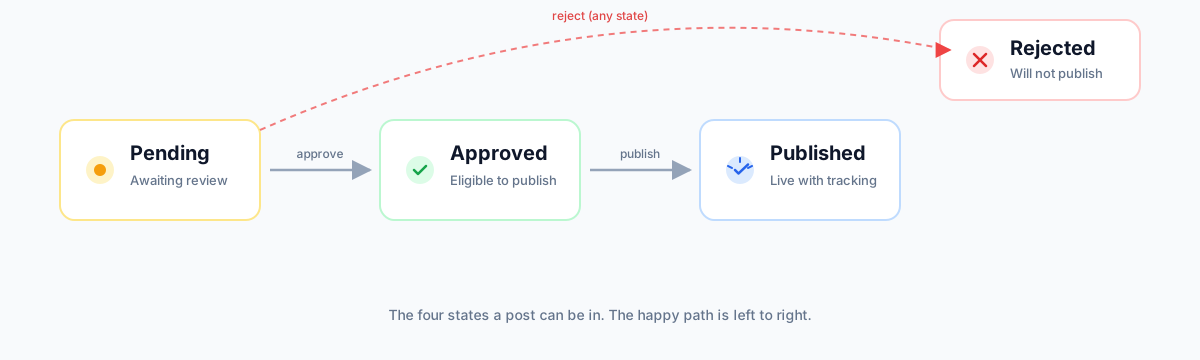
The four states of a post
- Pending — newly created. Waiting for you to approve, edit, or reject.
- Approved — you signed off (or Auto Pilot did). Eligible to publish — either manually, on a per-post schedule, or via the category scheduler.
- Published — already sent to at least one group. The post can still be re-published to additional groups later.
- Rejected — declined or failed. Not eligible to publish. The reason is stored on the post.
Where posts come from
Posts are not created automatically when you import a product. They are created on demand:
- Manually from a product card — go to Products, find a product, click Create Post. This is the everyday flow.
- From a bundle — bundles let you generate posts in batch from a curated set of products.
- Via Reposting — if you enable Reposting on a category, previously published posts get re-queued automatically after the configured interval.
How AI writes the copy
When you create a post, Afflow's AI writer generates the user-facing title, the "why to buy" body, an opening hook, and (if enabled) several alternative message variants — all in a few seconds while you wait. The tone, custom prompt, template, and number of variants all come from Posts → Settings for that post's category.
Each post creation uses 1 AI credit from your subscription. Generating extra variants uses additional credits per variant.
Skipping the Pending step (Auto Pilot)
If a category has Auto Pilot enabled, every new post is created with status approved instead of pending. The Pending step is fully skipped — the post becomes immediately eligible for manual or scheduled publishing. There is no AI confidence score, no threshold — Auto Pilot is a single on/off per category.
How tracking links are added
When a post is published to a group, Afflow generates a unique tracking tag and appends it to the affiliate URL. From that moment every click and every order on that exact link is attributed back to this specific post on this specific group, visible under Reports → Post Tracking.